

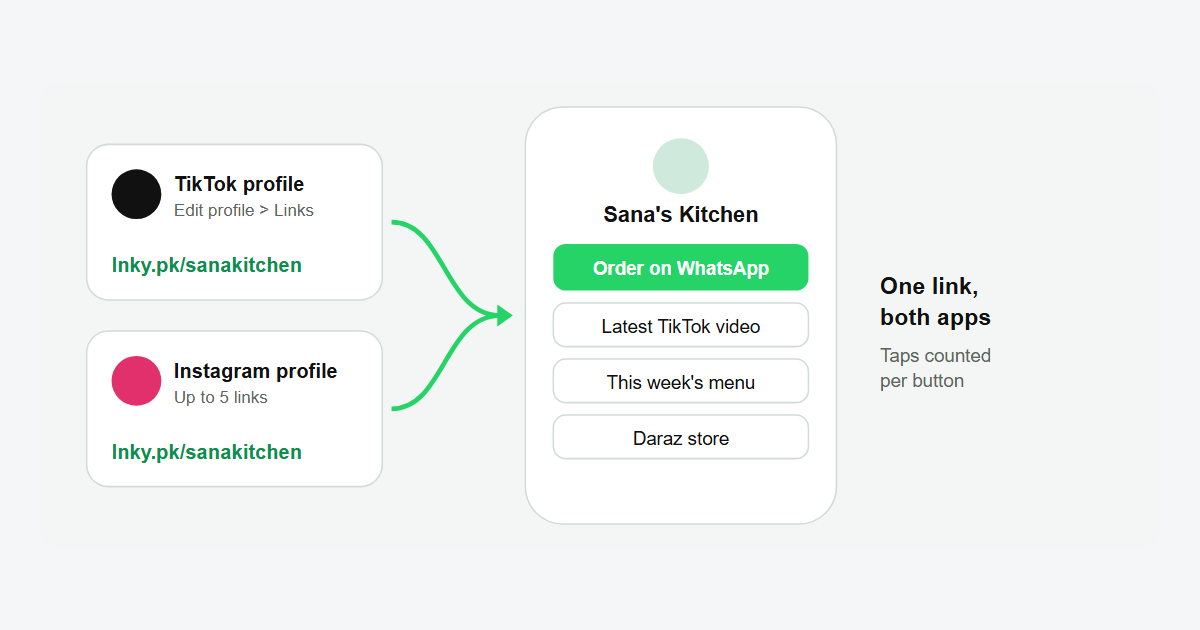
TikTok lets you add one clickable website link to your profile, but not every account gets the option. This guide shows how to add a link in your TikTok bio, what to do if you don't see the Links field yet, how to add up to five links on Instagram, and how one free bio page can hold all your links for both apps.
Who can add a link to their TikTok bio?
According to TikTok's help page Adding a website link to your profile, you can add a website link if:
- your account has at least 1,000 followers, or
- you have a Verified Business Account.
If neither applies, the Links option won't show in Edit profile yet. Switching to a normal business account on its own is not enough; TikTok's page says the business account has to be verified.
How to add a link in your TikTok bio
- Open the TikTok app and tap Profile at the bottom.
- Tap Edit profile.
- Next to Links, tap Add.
- Paste your link, for example
https://lnky.pk/yourbrand, and follow the steps to save it.
The link shows under your bio. When someone taps it, TikTok opens it in its in-app browser.
Two TikTok rules to know
- No links that open other social apps. TikTok says it no longer supports links that open or log you into other social media apps. A link to a website, including the website version of Instagram or YouTube, is fine.
- Link chains may ask to open the browser. For safety, TikTok limits how far people can browse through a chain of links in its in-app browser, so a visitor may see a message asking them to open the page in their phone's browser. TikTok recommends direct links. In practice: put the most important action, such as your WhatsApp order button, at the top of your page so people reach it in one tap.
No Links option yet? What to do
- Write your link as text in the bio. It won't be clickable, but a short, easy name like
lnky.pk/sanakitchenis simple to type. A long Daraz or Google Drive address is not. Make one with our custom URL shortener. - Grow to 1,000 followers. Once you pass it, check Edit profile again for the Links field.
- Use a QR code offline. Print the QR code of your bio page on packaging and flyers, so buyers find all your links without searching.
How to add links to your Instagram bio
Instagram is easier: every account can add links, and you can add up to 5 websites to your profile (Instagram Help: Add a website to your Instagram profile).
- Go to your profile and tap Edit profile.
- Tap Links, then Add link, and paste the address.
- Tap Done. To change the order, go to Links, tap Options, then Reorder links.
Five links is helpful, but a profile with five plain web addresses is hard to read. Many sellers put one bio page as the first link, because it opens straight to every option with clear buttons.
One link for TikTok and Instagram: a bio page
TikTok gives you one link and Instagram gives you five plain web addresses. A link in bio page solves both: one short link that opens a small page with all your buttons. Our guide Link in Bio: What It Means and How to Make a Free Page walks through it step by step. The short version with Lnky:
- Create a free account. The free plan includes one bio page.
- Open Bio Pages, create a page and pick your name, for example lnky.pk/yourbrand.
- Add your blocks. For TikTok creators and sellers, the useful ones are:
- TikTok Profile and TikTok Embed blocks, to show your profile or a video on the page.
- Instagram Post embeds and social icons for Instagram, TikTok, YouTube and more.
- A WhatsApp Message button with a ready-made message, so buyers can order in one tap. See our WhatsApp link guide.
- Links to your Daraz store, price list, booking form or latest video.
- Copy the link and add it in TikTok (Edit profile > Links) and Instagram (Edit profile > Links).
Each button tap is counted, so you can see if your TikTok or your Instagram sends more visitors. Our link tracking guide explains the stats.
Tips for a TikTok bio link that gets taps
- Say it in the video. "Order link in bio" on screen and in the caption.
- Keep the page short. Three to six buttons, the main action first.
- Use a name people can read. lnky.pk/sanakitchen looks trustworthy; a random string of letters doesn't.
- Update the page, not the bio. When the offer changes, edit your bio page. The link in TikTok and Instagram stays the same.
- Check it on your phone. Tap your own link from TikTok once after every change.
Frequently asked questions
Why can't I add a link to my TikTok bio?
TikTok shows the Links option only to accounts with at least 1,000 followers or a Verified Business Account. Until then, write a short link as text in your bio.
How many followers do you need for a link in your TikTok bio?
1,000 followers, unless you have a Verified Business Account.
Can I add more than one link on TikTok?
TikTok gives you one website link. Point it to a bio page so that one link leads to all your others.
How many links can I add to my Instagram bio?
Up to 5 websites, and you can reorder them in Edit profile > Links.
Is the Lnky bio page free?
Yes. The free plan includes one bio page with click stats for 30 days.