

A WhatsApp link opens WhatsApp straight to a chat, a group or a business, with one tap. Sellers put it in their Instagram bio, on Facebook posts and on flyers, so customers can message them without saving a number first. This guide shows how to create each kind of WhatsApp link, how to add a ready-made message, and how to see how many people tapped it.
The three kinds of WhatsApp link
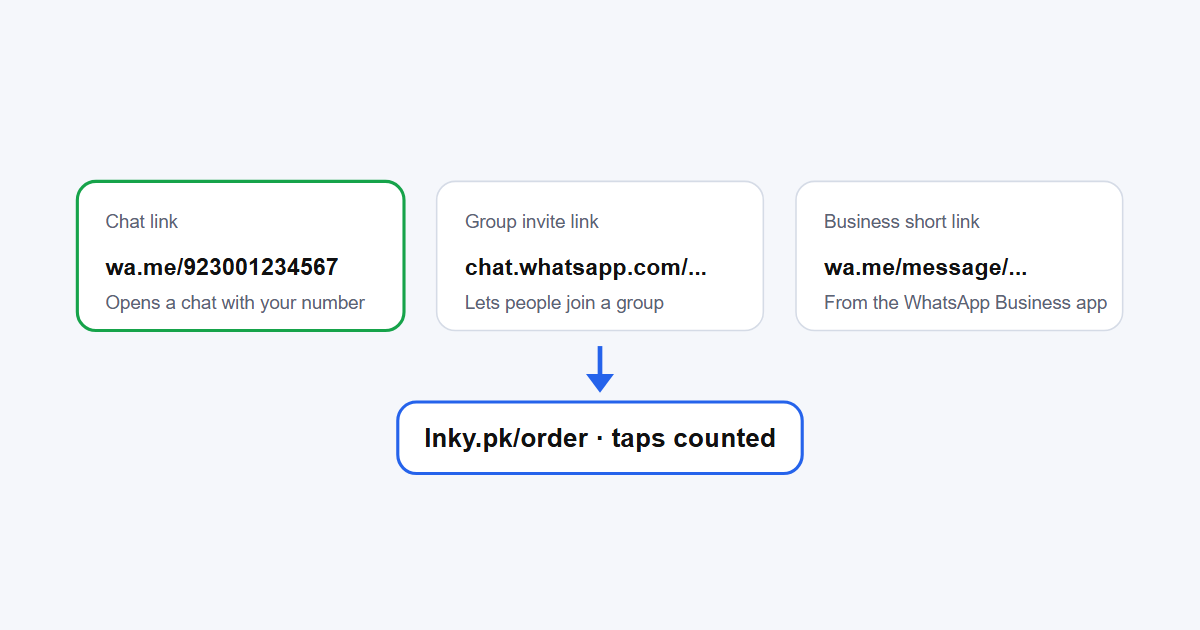
- Chat link (wa.me): opens a chat with a phone number. Anyone can make one, for any WhatsApp number.
- Group invite link (chat.whatsapp.com): lets people join a group. It's created inside the group.
- WhatsApp Business short link (wa.me/message/...): made by the WhatsApp Business app for your business number.
How to create a WhatsApp chat link with your number
The quickest way is our free WhatsApp link generator: enter your number and an optional message, and it makes the link and a QR code. To build it yourself:
- Start with
https://wa.me/. - Add your full number in international format, without the plus sign, spaces or the leading zero. For Pakistan, 0300 1234567 becomes
923001234567. - The result is
https://wa.me/923001234567. Anyone who taps it gets a chat with that number.
WhatsApp explains this format in its help article How to use click to chat.
Add a ready-made message
Add ?text= and your message to the end of the link, with spaces written as %20:
https://wa.me/923001234567?text=Assalam%20o%20Alaikum%2C%20I%20want%20to%20orderThe message appears in the customer's typing box, ready to send. They can still change it. The generator does the encoding for you.
How to create a WhatsApp group link
- Open the group in WhatsApp and tap the group name at the top.
- Tap Invite to group via link.
- Copy the link, share it, or show its QR code.
Anyone who has the link can join and pass it on, so share it carefully. Group admins can reset the link to stop the old one from working, and can turn on approval so new members must be accepted first. WhatsApp covers this in How to create and invite into a group.
WhatsApp Business short link
If you use the WhatsApp Business app, it already has a short link for your number. Find it under Tools > Short link, where you can also set a default message and get a QR code. WhatsApp's guide: How to create short links.
Make your WhatsApp link short and trackable
A wa.me link with a message gets long, and none of these links tell you how many people tapped. Paste any WhatsApp link, chat, group or business, into the Lnky URL shortener to get a clean link such as lnky.pk/order. With a free account you can:
- choose the name, so it's easy to read on a poster or say out loud;
- see taps by day, city and device;
- change where it points later, for example if your number changes, without reprinting your QR codes;
- make one link per place, such as Instagram bio, Facebook ad and shop flyer, to see which brings the most chats. Our link tracking guide explains the stats.
Where to use your WhatsApp link
- Instagram and TikTok bio: as the main link, or as an "Order on WhatsApp" button on a link in bio page.
- Facebook posts and page buttons.
- Google Business Profile, email signature and website.
- Printed material: visiting cards, packaging, shop counters and menus, as a QR code. See QR code for business for printing tips.
Common problems
- "Phone number shared via url is invalid": check the country code and remove the leading 0 and any plus sign, spaces or dashes.
- The message doesn't appear: the text after
?text=must be URL-encoded. Use the generator to avoid mistakes. - The group link stopped working: an admin may have reset it. Ask for the new link.
Frequently asked questions
Is a WhatsApp link free?
Yes. wa.me links, group links and Business short links are all free. Shortening them and seeing tap stats on Lnky is free too.
Do people need to save my number?
No. A wa.me link opens the chat even if your number isn't in their contacts.
How do I write a Pakistani number in a WhatsApp link?
Use 92 followed by the number without the first 0. For example, 0300 1234567 becomes 923001234567.
Can I see how many people clicked my WhatsApp link?
Not with WhatsApp alone. Shorten the link with Lnky and you'll see taps by day, city and device.
.png)