.png)
This free WhatsApp link generator turns your phone number into a click-to-chat link. Anyone who taps it opens a WhatsApp chat with you, without saving your number first. Add a ready-made message, copy the wa.me link, download a QR code, or make it short and trackable with Lnky.
Your WhatsApp link
QR code
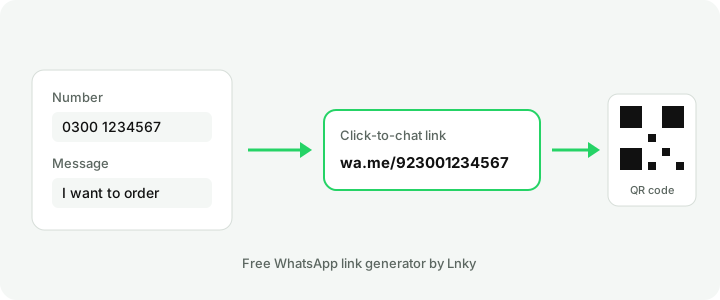
How to use the WhatsApp link generator
- Enter your country code. It is 92 for Pakistan, 971 for the UAE, 966 for Saudi Arabia and 44 for the UK.
- Type your WhatsApp number. You can write it the way you normally do, for example 0300 1234567. The tool removes the first 0, spaces and dashes for you.
- Add a message if you want one. It appears in the customer's chat box, ready to send, so they don't have to think of what to write.
- Press Generate WhatsApp link, then copy the link, test it, or download the QR code.
The link and QR code are made in your browser. We don't store your number unless you choose to shorten the link with a Lnky account.
What is a wa.me link?
A wa.me link is WhatsApp's official click-to-chat address. It has your full phone number in international format, with no plus sign, leading zeros, spaces or brackets. A Pakistani number 0300 1234567 becomes:
https://wa.me/923001234567To add a message, WhatsApp uses a text parameter. Spaces and symbols must be encoded, which this tool does for you:
https://wa.me/923001234567?text=Hi%2C%20I%20want%20to%20orderWhatsApp explains the format in its help article How to use click to chat. The link works on Android, iPhone and WhatsApp Web, for personal and WhatsApp Business accounts.
Where to use your WhatsApp chat link
- Instagram and TikTok bio. Put the link in your bio, or add it to a free Lnky bio page next to your shop, menu and price list.
- Facebook page. Use it as the button link or in posts, so buyers message you in one tap.
- Google Business Profile. Add it to your profile so people who find you on Google Maps can chat straight away.
- Visiting cards, flyers and shop counters. Print the QR code. Customers scan it with their camera and the chat opens.
- Your website. Add a "Chat on WhatsApp" button that uses the link.
- Ads and SMS campaigns. Send people to a chat instead of a long form.
Make your WhatsApp link short and trackable
A raw wa.me link with a message can get long and messy. Paste it into the Lnky URL shortener to get a clean link such as lnky.pk/order. A free account also shows how many people clicked, from which city and on which device. You can change where the short link points later, so printed QR codes keep working even if your number changes. Need a custom design? Try the QR code generator to add your logo and colours.
Tips for a better WhatsApp chat link
- Write the message the way your customer would: "Hi, I want to order the black kurta, size M."
- Use a different message for each campaign, so you can tell which post or poster brought the chat.
- Test the link on your own phone before you print it.
- Use WhatsApp Business to add a greeting message, quick replies and a catalogue.
WhatsApp link generator FAQ
Is this WhatsApp link generator free?
Yes. Making the wa.me link and the QR code is free and needs no signup. Short links with click stats need a free Lnky account.
Do people need to save my number?
No. The link opens a chat with your number even if it is not in their contacts.
Why does my link say the number is not on WhatsApp?
Check the country code and remove the leading 0. A Pakistani number must start with 92, for example 923001234567, not 03001234567.
Can I use a WhatsApp group link here?
No. Group invite links come from the group settings in WhatsApp (chat.whatsapp.com). You can still shorten a group invite link with Lnky.
Does the QR code expire?
No. The QR code holds the wa.me link itself, so it works as long as the number is on WhatsApp.